Dispatcher Desk · Included in Every Plan
Dispatcher On-The-Go
Put your dispatchers on the shift schedule and let them run the desk from a phone, tablet or computer: at the station, at home, in a vehicle or at an event. Resgrid offers each pending call, text and phone call to a free dispatcher, keeps a shared queue so nothing is missed, and plans breaks around coverage.
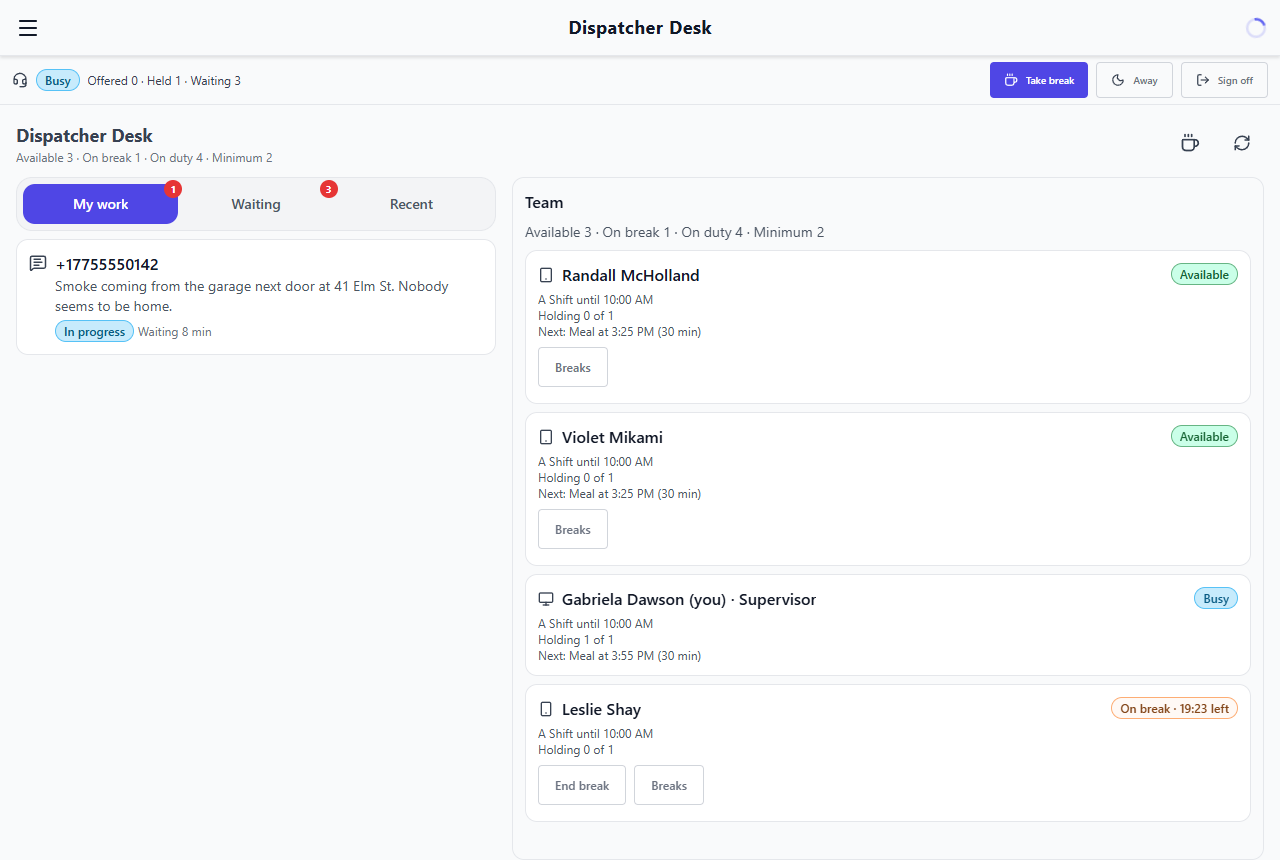
A Dispatch Desk That Goes Where Your Dispatchers Go
Shift-based dispatchers, fair routing, a shared queue, and break planning around desk coverage.
Dispatchers on the Shift Schedule
Add dispatchers to Assigned or Signup shifts, on a dispatch-only shift or beside responders on the same schedule. Mark a desk supervisor right on the roster.
Run the Desk From Anywhere
Dispatchers sign in to the desk in the Resgrid Dispatch app on a phone, tablet or computer, from the station, at home, in a vehicle or at an event.
One Offer at a Time
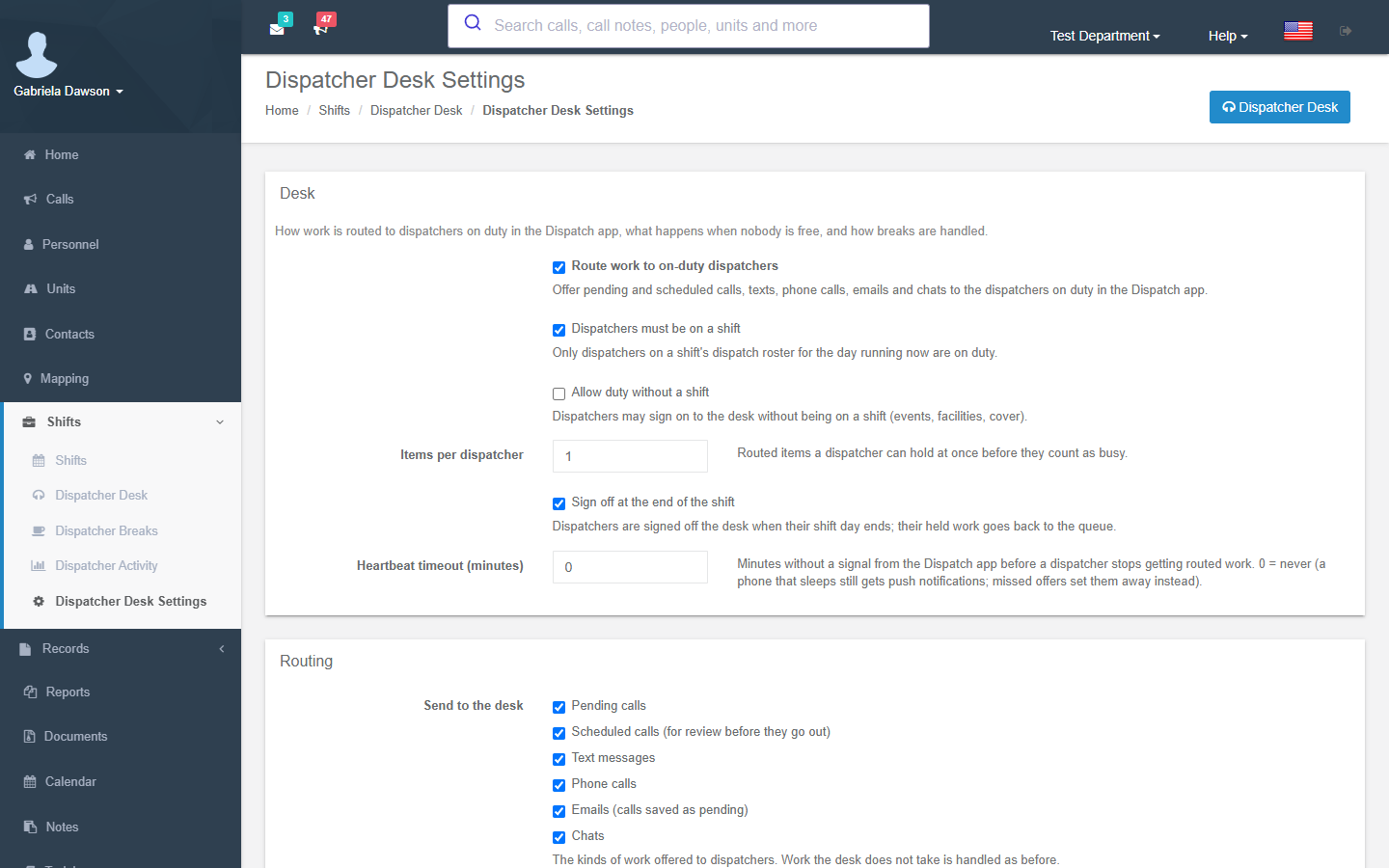
Pending and scheduled calls, texts, phone calls, email and chat are offered to one free dispatcher at a time to accept or decline, with a 45-second offer by default.
A Shared Queue, Nothing Missed
Work nobody has taken waits in a shared queue any on-duty dispatcher can take, and escalates to everyone on duty and the supervisors after a few minutes.
Breaks and Lunches
Length-based breaks with a reminder, a "break over" alert and an optional automatic return. On break, the desk stays quiet: no routed work and no desk alerts.
Coverage You Can See
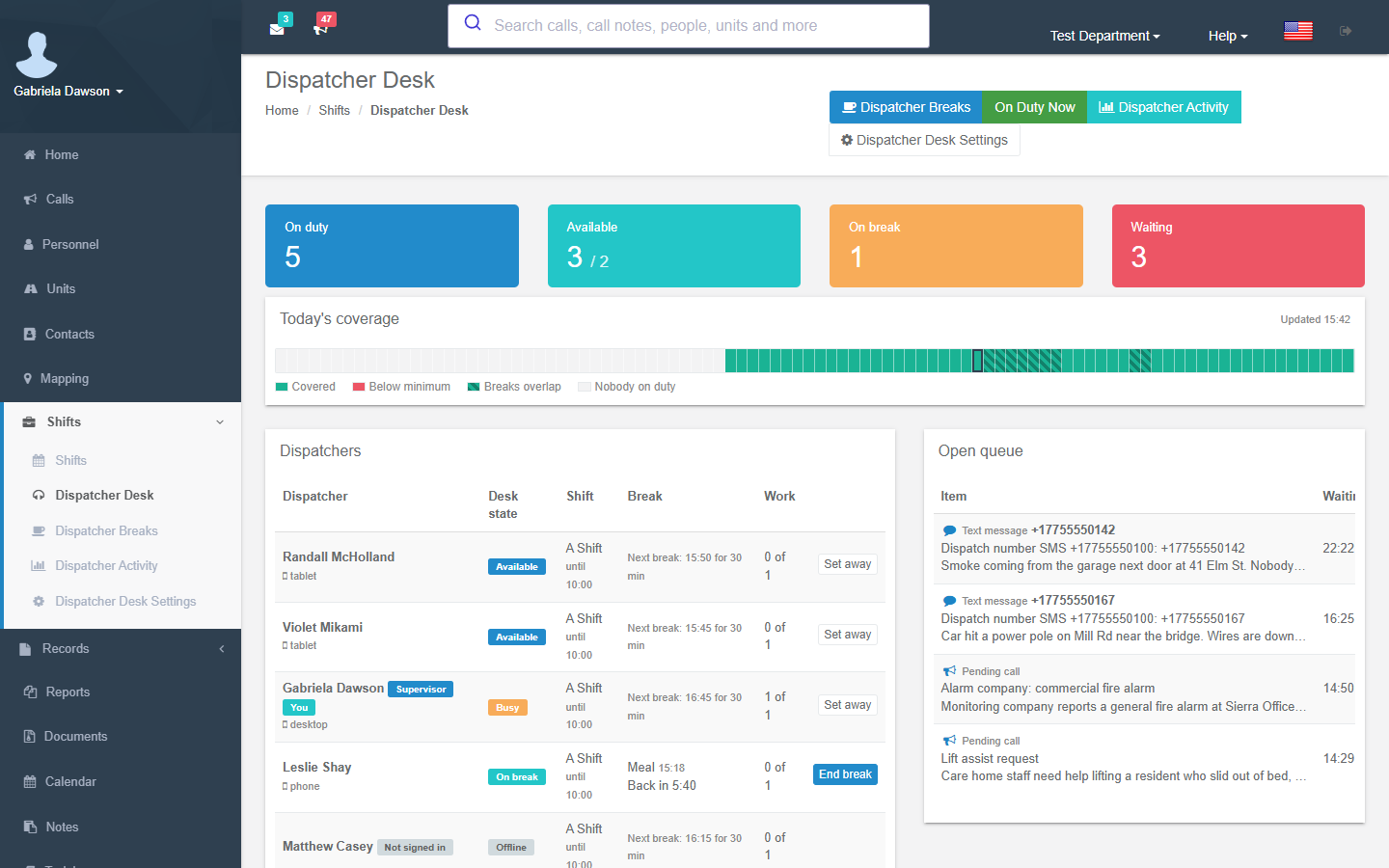
Every dispatcher's breaks on one timeline. A minimum-available setting warns, or blocks, a break that would leave the desk short, and "Plan breaks" staggers a shift's breaks for you.
Calls Ring Your Own Phone
Callers are held while the desk rings the dispatcher's own phone; press 1 to connect. No special VoIP hardware or softphone to install.
Overflow When Everyone Is Busy
When nobody is free, live work can go to Enhanced AI to become a pending call, and emailed dispatches can be sent at once, held as pending, or read by Enhanced AI.
Supervisor Board and Activity Report
Supervisors see the whole team, end breaks and hand work over. The activity report counts offers, accepts, misses and breaks.
Desk Routing and the Shared Queue
Turn on the desk and Resgrid offers each new piece of work to one free, on-duty dispatcher at a time: the least loaded first, then whoever has waited longest for an offer. The dispatcher accepts or declines; an offer that runs out moves to the next dispatcher. Anything nobody can take right now waits in a shared queue that every dispatcher on duty can see and take from.
- Pending calls, scheduled calls, texts, phone calls, email and chat
- Scheduled calls come to the desk for review before they go out (they still go out on time by themselves)
- Accept or decline, with a 45-second offer by default
- Declined or missed work is never offered to the same dispatcher again
- Waiting work escalates to everyone on duty and the supervisors after 3 minutes by default
- A dispatcher holding work shows as Busy; missed offers in a row set them Away
- Hand work over to another dispatcher, or return it to the queue
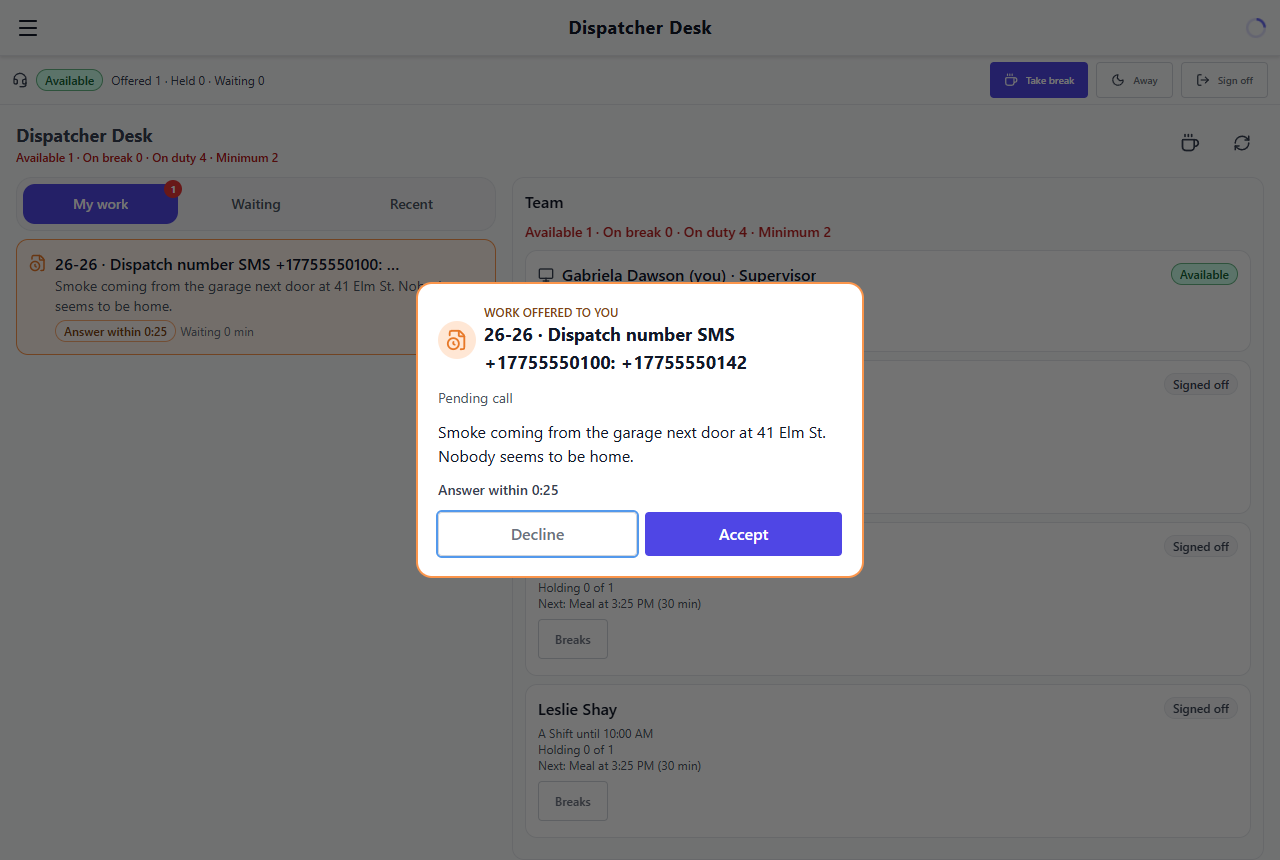
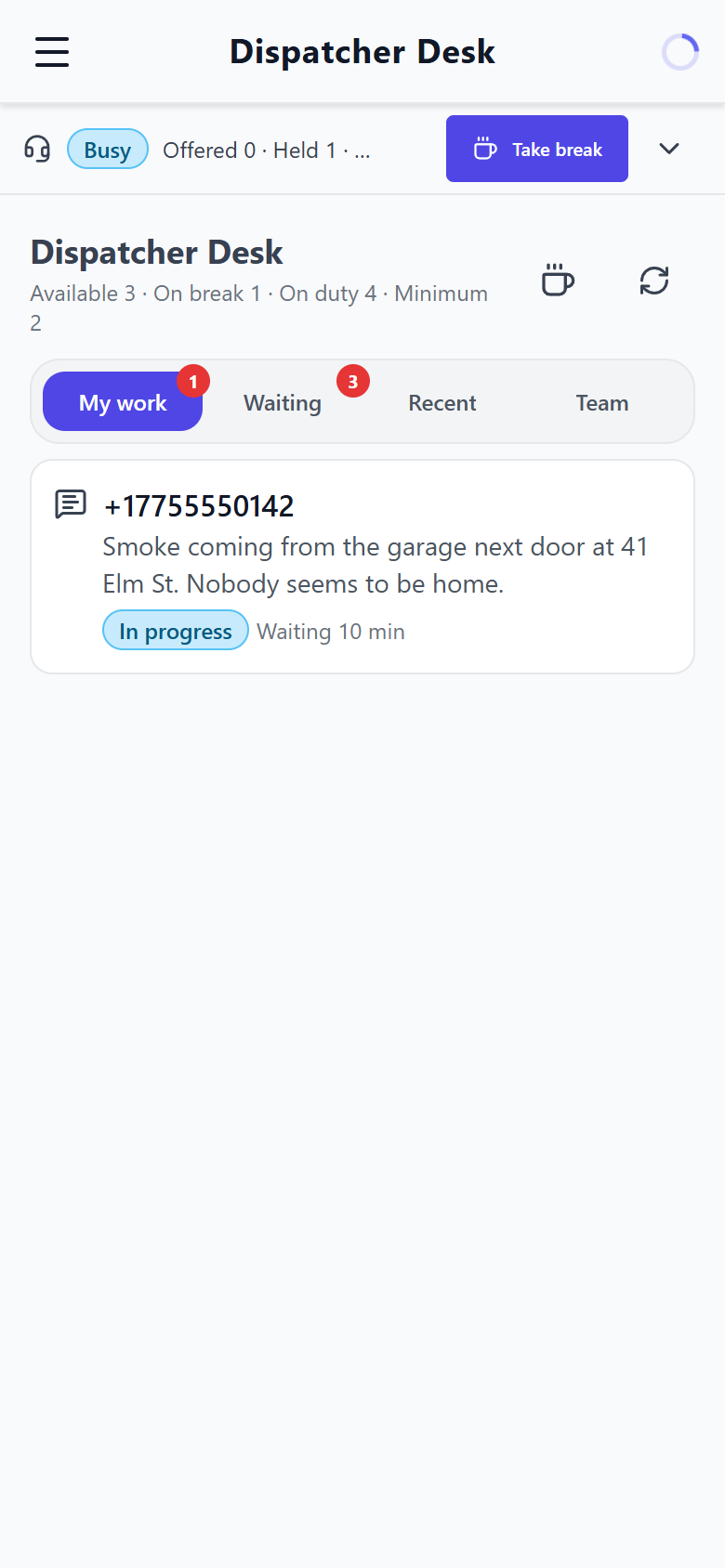
Work From Any Device, Anywhere
Dispatcher On-The-Go means the desk is wherever your dispatcher is. Sign in to the desk in the Resgrid Dispatch app on a phone, tablet or computer, and work goes to you through push notifications and in-app alerts, with the Dispatch app's own sound set so desk alerts are easy to tell apart. Phone calls ring the dispatcher's own phone, so a volunteer covering from home needs nothing extra.
- Phone, tablet and desktop layouts in the Resgrid Dispatch app
- Station, home, vehicle, event or facility
- Push notifications and in-app offers, with distinct desk sounds
- Answer a held caller: the desk rings your phone, press 1 to connect
- Call back a caller who hung up before anyone answered
- Optionally allow unscheduled duty for events and cover, outside the shift roster
- Signed off when the shift day ends; held work goes back to the queue
Breaks, Lunches and Coverage
Dispatchers plan their breaks and lunches, and everyone sees every dispatcher's breaks on one coverage timeline, so it is easy to spot two people planning to be off the desk at the same time. A break is a length, not a fixed window: start it early and you are due back early. The desk reminds you before it starts, tells you when it is over, and can bring you back automatically.
- Breaks, meals, personal and other breaks, each with its own length
- Reminder before a planned break (5 minutes by default), "due now" and "break over"
- Optional automatic return a set number of minutes after a break runs out
- Quiet on break: no routed work, no desk pushes or in-app alerts until you are back
- Minimum available dispatchers: warn, or block, a break below coverage unless a supervisor starts it
- "Plan breaks" staggers a shift's breaks across the day without overlap
- Supervisors are told when someone is overdue back from break
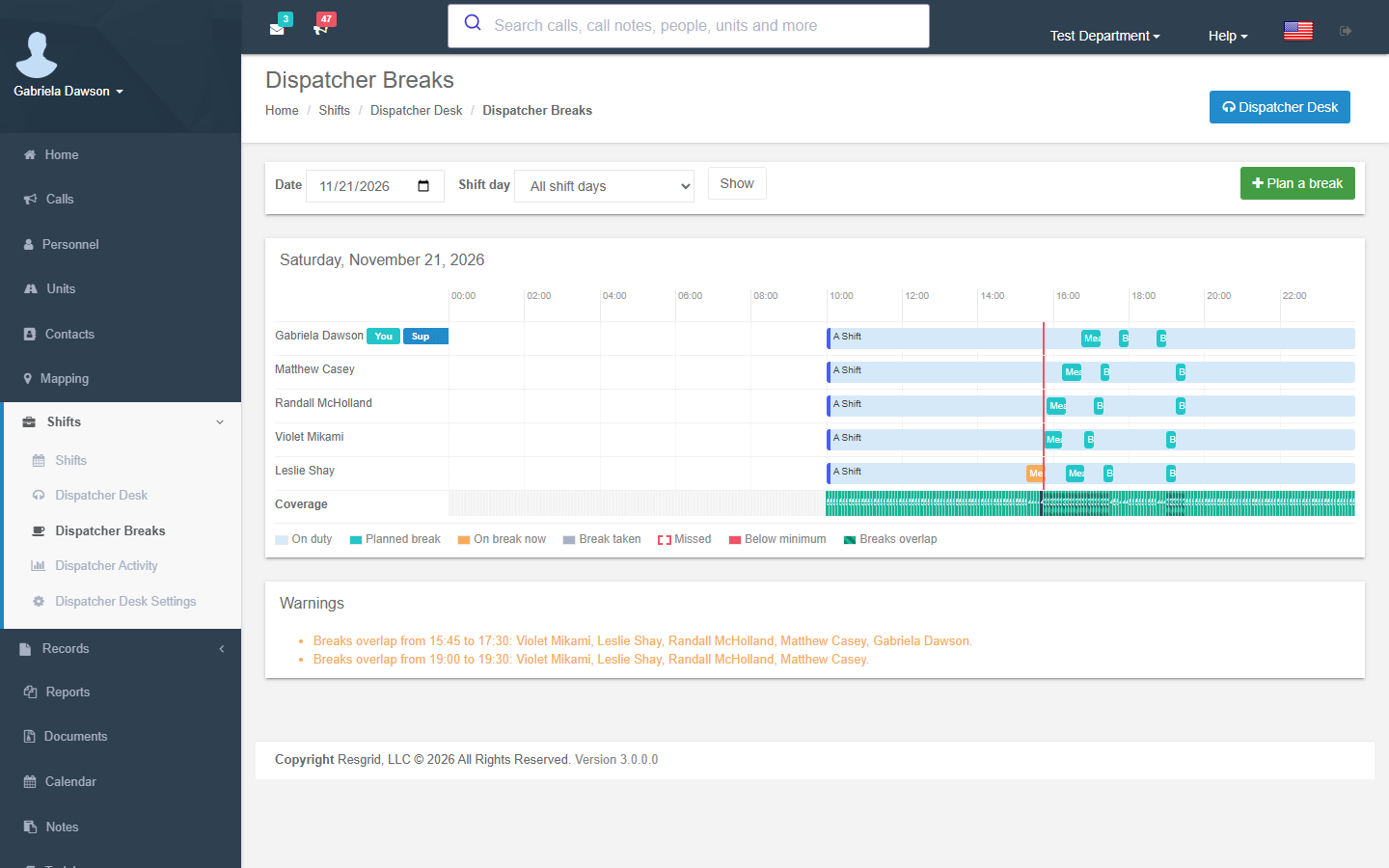
Supervisors and Reporting
Mark a desk supervisor on a shift's dispatch roster and they can manage that shift's breaks and move work between dispatchers. In the Resgrid web app, the desk board, break planner, desk settings and activity report sit alongside your shifts.
- Team board: who is available, busy, away or on break
- End a break or hand work over to another dispatcher
- Web desk board and break planner
- Desk settings for routing, offers, breaks, coverage and overflow
- Activity report: offers, accepts, misses and breaks
- Shift managers and department admins manage rosters and breaks too
Texts and Calls From the Public
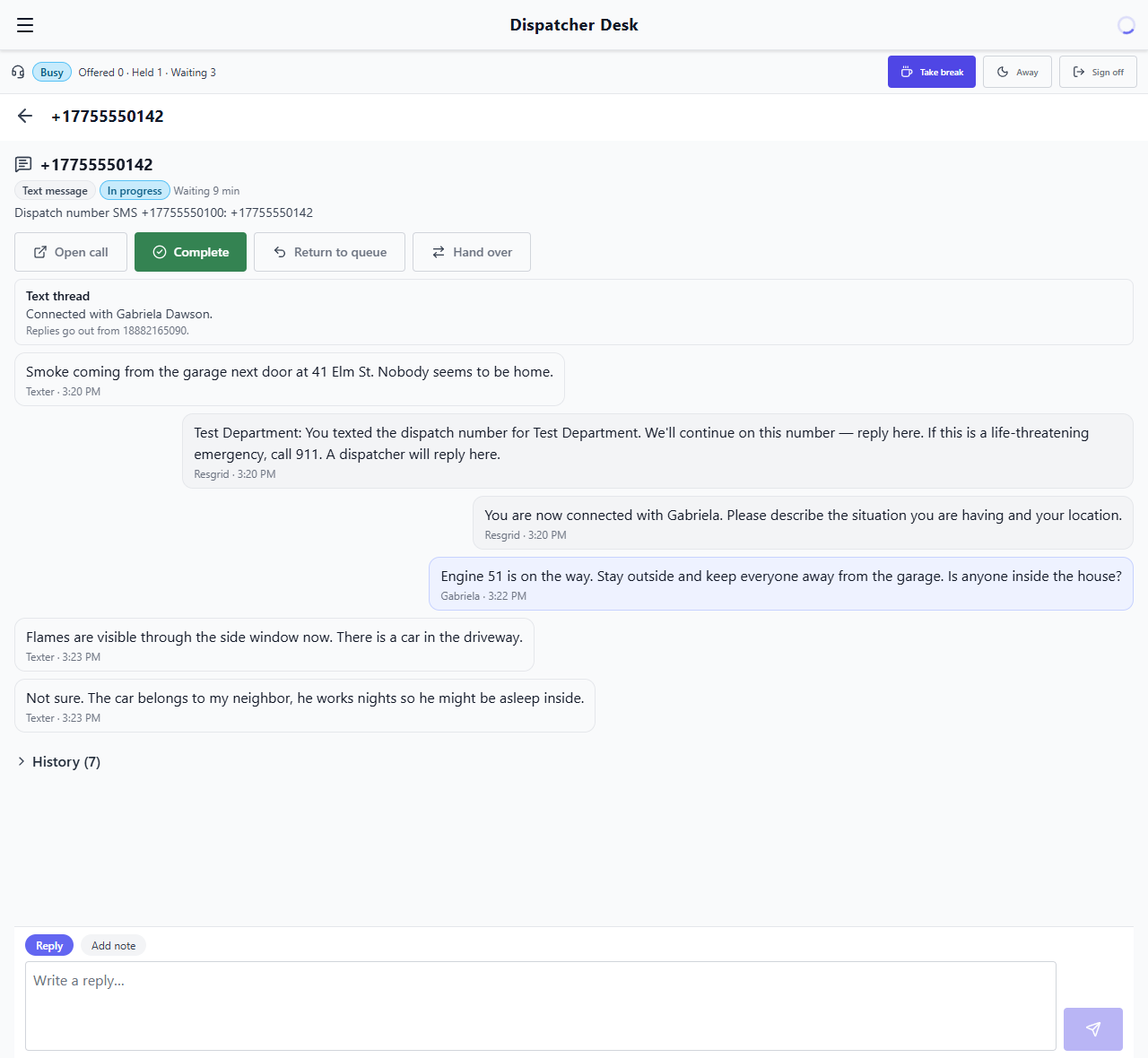
Give the public a number of your own with the Private Inbound Dispatch Number add-on. Every text becomes a pending call and a text conversation that a dispatcher can take on the desk and answer. Phone calls can be answered by Enhanced AI voice intake, which asks the caller what is happening, where, their name and a callback number, and turns the answers into a pending call.
- A local number you pick by area code, city or postal code in supported regions
- Texts become pending calls, with the conversation offered to a free dispatcher
- Dispatchers read and reply from the desk; replies go from Resgrid's main number for your region
- Voice intake with Enhanced AI; without it, callers are asked to text the number instead
- Spam screening: block senders, a press-1 check for robocalls and a per-sender limit
- Texters are told to call your emergency number for a life-threatening emergency
- US$15/month for a US or Canadian number, or €20/month on EU Central; needs an active paid plan
Overflow to Enhanced AI
When every dispatcher is busy or on break, nothing is dropped. Texts and chat wait as pending calls in the shared queue, or Enhanced AI fills in the pending call's type, priority and address while it waits. Callers can be taken by Enhanced AI voice intake or leave a message that becomes a pending call. Enhanced AI creates pending calls for a dispatcher to review; it never dispatches on its own.
- Texts and chat: wait in the queue, or Enhanced AI fills in the pending call
- Phone calls: Enhanced AI voice intake, or a voicemail that becomes a pending call
- Optional hold time before a caller overflows
- Emailed dispatches: dispatched at once (as today), held as Pending, or read by Enhanced AI into a pending call
- Uses the Enhanced AI add-on; without it, work still waits as pending calls
- Enhanced AI does not read call content for departments enrolled in Advanced Data Protection
What's Included
The desk is part of every Resgrid plan. Add Enhanced AI or a Private Inbound Dispatch Number only if you want them.
The dispatcher desk
Included
Dispatchers on shifts, routing, the shared queue, breaks, coverage, the supervisor board and the activity report are included in every plan. No add-on. Text and phone-call channels need a paid plan.
See plansEnhanced AI overflow
Enhanced AI add-on
Overflow to Enhanced AI, AI-read emailed dispatches and voice intake use the Enhanced AI add-on your department may already have.
About Enhanced AIPrivate Inbound Dispatch Number
US$15 or €20 / month
A number of your own for texts and calls from the public. US$15 a month for a US or Canadian number, €20 a month on EU Central. Needs an active paid plan.
How it worksBuilt Into the Resgrid You Already Use
The desk works from your shifts, pending and scheduled calls, and the text, phone, email and chat channels your department already receives.
Shifts
Pending Calls
Scheduled Calls
Text (SMS)
Phone Calls
Chat
Push Notifications
Enhanced AI
Dispatcher On-The-Go Questions
Is the dispatcher desk an add-on?
No. Putting dispatchers on shifts, routing work to them, the shared queue, breaks and coverage planning, the supervisor board and the activity report are included in every plan. Text and phone-call channels need a paid plan. Two related options are paid add-ons: Enhanced AI, for overflow help when everyone is busy, and the Private Inbound Dispatch Number, for a public number of your own.
Can our dispatchers work from home or from a vehicle?
Yes. Dispatchers sign in to the desk in the Resgrid Dispatch app on a phone, tablet or computer. Offers arrive as push notifications and in-app alerts, and phone calls ring the dispatcher's own phone, so the desk works from the station, at home, in a vehicle or at an event.
Do we need VoIP phones or a softphone?
No. A caller is held while the desk rings the dispatcher's own phone, either a callback number they set or the mobile number on their profile. They press 1 to connect to the caller. There is no special hardware or softphone to install.
What happens when every dispatcher is busy?
Calls wait in the shared queue for the next free dispatcher and escalate to everyone on duty and the supervisors after a few minutes. Texts and chat wait as pending calls, or Enhanced AI fills them in while they wait. Phone calls can go to Enhanced AI voice intake or to voicemail, and both become pending calls. Enhanced AI never dispatches by itself.
How do breaks work?
A break has a length, not a fixed window, so starting early means coming back early. Dispatchers get a reminder before a planned break and a "break over" alert, and the department can turn on an automatic return. While on break a dispatcher gets no routed work and no desk alerts. A coverage timeline shows everyone's breaks, and a minimum-available setting can warn or block a break that would leave the desk short.
What does the Private Inbound Dispatch Number cost?
US$15 a month for a US or Canadian number, or €20 a month on EU Central. It needs an active paid Resgrid plan. Texts to the number become pending calls and conversations a dispatcher can answer; voice intake on the number uses the Enhanced AI add-on. Monthly fair-use limits apply.
Setting it up? Read the Dispatcher Desk docs or the desk in the Dispatch app.