Readiness Pro Addon
Readiness Pro
Preventive maintenance and work orders for the apparatus, equipment, stations, and assets you already run in Resgrid. A failed check becomes an owned, priced, deadline-bound repair, and the evidence stays attached to the Unit. Checklists stay free; this is what happens after one fails.
WO #2026-00318

  Unit       Engine 1
  Source     Rig Check, item 14
  Priority   High
  Status     Waiting on parts

  Assigned   Shop / Mechanic
  Approval   Approved, $420 cap
  Due        Fri 09:00

  Engine 1 is out of service
What Every Department Already Gets
Checklists are free. Every Resgrid department, on every plan, free tier included, can define, schedule, and complete readiness checks at no additional cost. Readiness Pro is not a paywall around that. It is what happens after a check fails.
Versioned Checklists
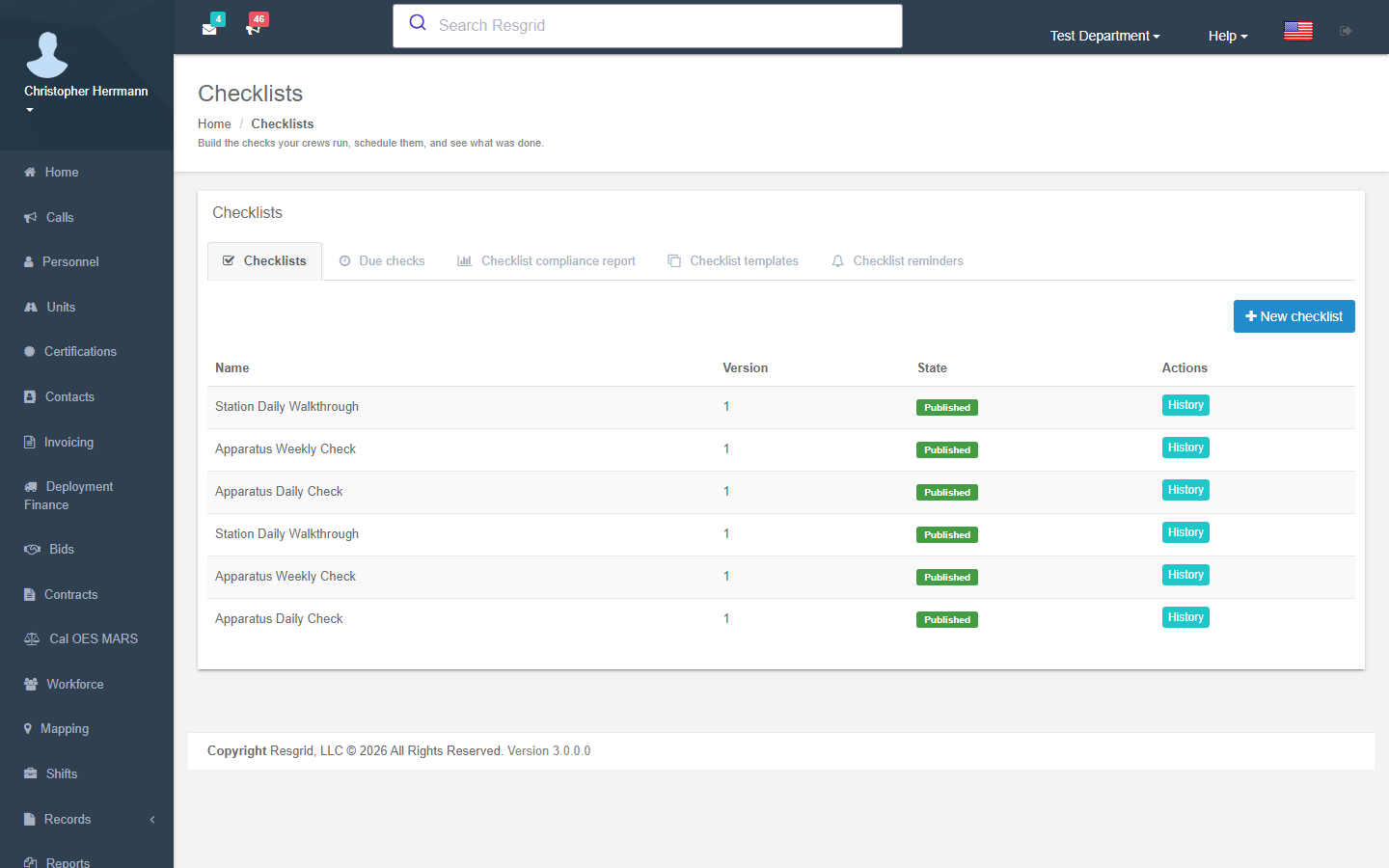
Build reusable, versioned checklist definitions for a rig, station, crew, safety process, or serialized asset, mixing pass/fail, quantity, numeric reading, photo, signature, date, selection, and free-text items.
Scheduled Occurrences
Attach a definition to a department, group, Unit, person, or asset and schedule it on demand, per shift, daily, weekly, monthly, quarterly, semiannually, or annually. Due work shows up as a Calendar layer.
Completion in the Field
Crews complete Unit checks in the Unit app and personal or shift checks in Responder, with a bounded offline flow so answers and photos survive a dead cell site and sync without duplicate completions.
Where checklists stop
A checklist tells you the pump pressure was low, the ladder was out of date, or the compartment was short two masks. It does not assign anyone to fix it, hold the spend for approval, order the part, track how long the rig was down, or keep the invoice next to the defect when an auditor asks a year later. That gap is where readiness quietly turns back into a shared spreadsheet. Readiness Pro closes it by turning the failure into owned, priced, deadline-bound work against the same Unit or asset the check was run on.
Define
Included with every plan
Versioned checklist definitions with scoring, ranges, photos, and signatures
Covers: Knowing what the standard is
Schedule
Included with every plan
Per-shift through annual occurrences on Units, people, groups, and assets
Covers: Knowing what was due, done, missed, or skipped
Complete
Included with every plan
Attributable completions in the Unit and Responder apps, with retained evidence
Covers: Knowing who found the problem, and when
Repair
Readiness Pro addon
Work orders, preventive maintenance, parts, labor, vendors, approvals, and cost
Covers: Actually closing the defect, and proving it was closed
Adding Readiness Pro does not change the three stages above it. Your checklists, schedules, and completions stay exactly as they are and gain a repair lifecycle on the end.
What the Addon Adds on Top
Preventive scheduling, an accountable work-order lifecycle, real cost capture, and readiness reporting that comes out of the repairs themselves.
Preventive Maintenance Scheduling
Schedule service by date, mileage, or engine hours against the Unit or serialized asset dispatch already uses. Upcoming and overdue work surfaces before a rig fails a check instead of after it fails on a call.
Work Orders With a Real Lifecycle
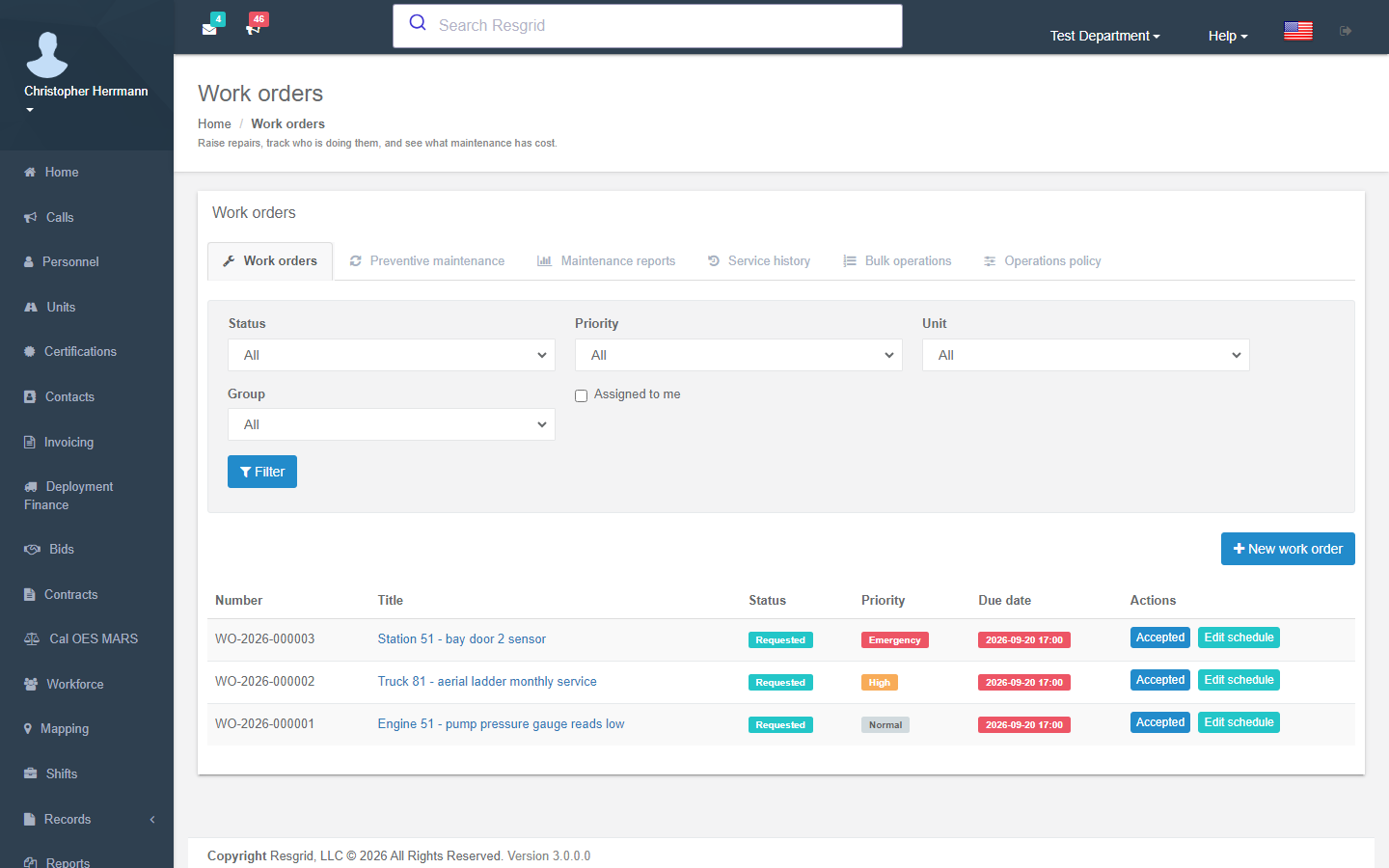
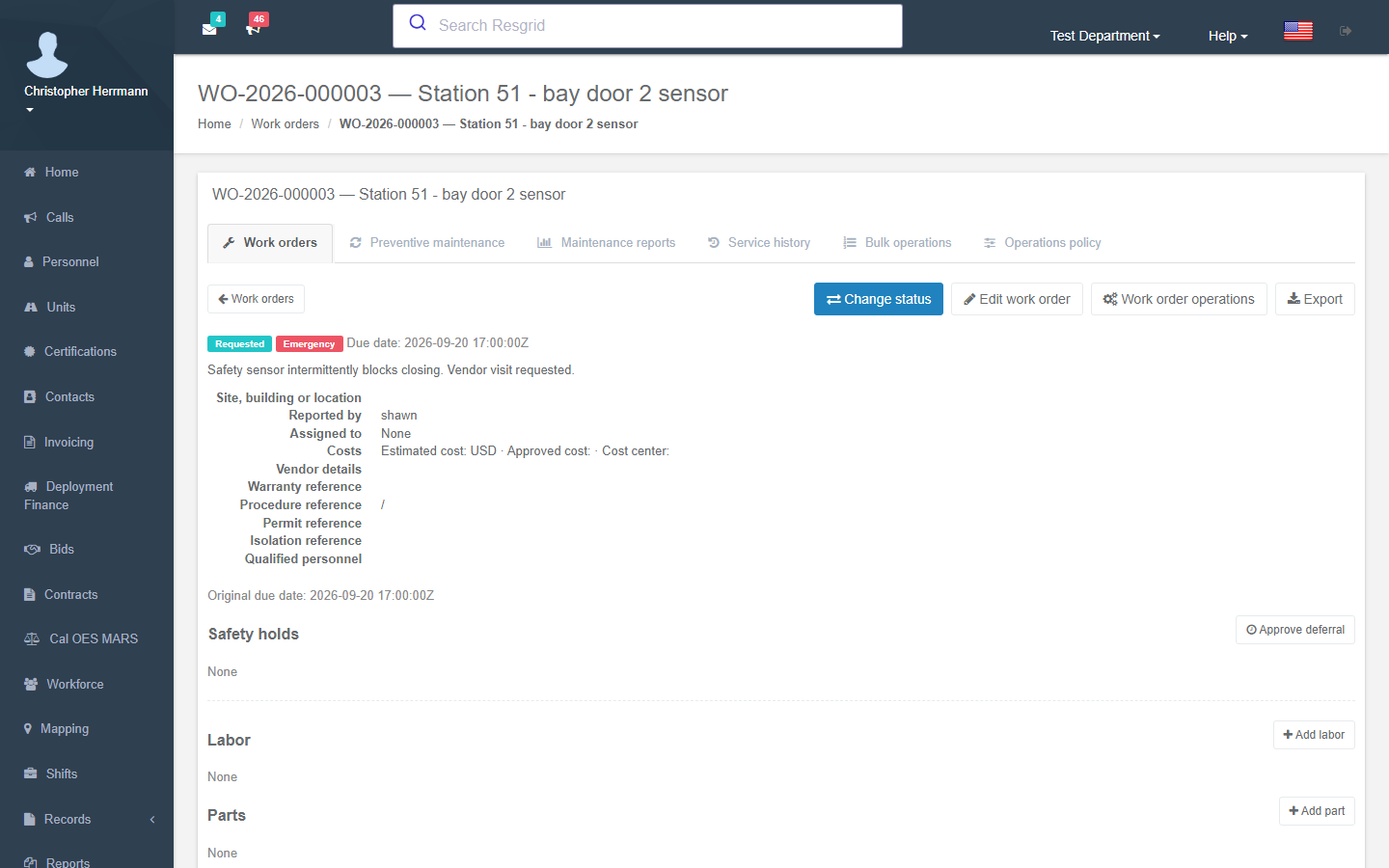
Submitted, triaged, assigned, in progress, on hold, waiting on parts, completed, closed. Every request gets a human-readable number, an owner, a priority, and an activity trail instead of a spot on a whiteboard.
Assignment to People and Roles
Route work to a mechanic, a facilities role, or a station crew. Separate permissions govern who can view, manage, complete, and report on maintenance, so completing a repair is not the same right as authorizing one.
Parts, Labor, and Vendor Cost
Record parts consumed, hours worked, outside vendor references, and repair cost on the work order itself. Downtime, recurring failures, and mean-time-to-repair come out of the same records rather than a separate spreadsheet.
Spending Approvals and Deadlines
Put an approval in front of spend and a service deadline behind it. Command sees what is waiting on a decision, what is waiting on a part, and what is going to miss its date, while the work is still recoverable.
Readiness Reports and Automation
Feed department-level readiness reporting from actual completions and repairs, and let the Workflow engine notify, escalate, or act when work is opened, held, overdue, or closed.
One Defect, End to End
The same failed item a crew member records during a morning rig check is the record an auditor reads two years later. Nothing is re-keyed between these steps.
1
A check fails
A crew member fails an item on a rig check in the Unit app and attaches the required note or photo.
Included free
2
Work is opened
The failure opens a prioritized work order, notifies the responsible role, and can place the Unit out of service.
Readiness Pro
3
It gets an owner
A supervisor triages and assigns it to a mechanic or facilities role, with an approval in front of any spend.
Readiness Pro
4
The repair is done
Parts, labor, vendor, downtime, and cost are recorded against the order as the work moves to completion.
Readiness Pro
5
The evidence stays
The closed work follows the Unit or asset as searchable readiness evidence for audits, claims, and records.
Readiness Pro
From a Failed Check to a Closed Repair
A failed checklist item is only useful if something happens next. With Readiness Pro a configured failure can require a note or a photo, open a prioritized work order, notify the responsible role, and place an affected Unit out of service, with the original answer still linked to the repair that came out of it. Field requests that never started as a check enter the same queue, so there is one place supervisors triage from.
- Failed items escalate into prioritized, owned work orders
- Optional automatic out-of-service action for safety-critical failures
- Ad-hoc field requests land in the same triage queue
- Comments, attachments, status changes, and system activity on every order
- The originating defect stays attached to the repair record
- Automation appends to history and never rewrites the original answer
Preventive Work Against the Equipment You Already Dispatch
Preventive maintenance is scheduled by date, mileage, engine hours, or department policy, and it references the Resgrid Unit or Inventory asset your crews, deployments, and records already point at. There is no second asset list to reconcile, and service history follows the equipment through location and custody changes rather than living in a spreadsheet on one workstation.
- Schedule by date, mileage, engine hours, or department policy
- Service history follows a Unit or serialized asset, not a location
- Inventory parts draw on ledger transactions, with free-text fallback when Inventory is off
- Downtime, labor, vendor, parts, and repair cost captured on the work
- Recurring failure and mean-time-to-repair inputs come from real records
- No duplicate fleet or asset list to maintain inside a separate CMMS
Approvals, Deadlines, and What It Actually Cost
Maintenance is a budget problem as much as an operational one. Readiness Pro puts spending approvals in front of the work and service deadlines around it, then keeps the parts, labor, and vendor cost on the record afterward. Command and administration can see what is blocked on a decision, what is blocked on a supplier, and what a piece of apparatus has cost to keep in service this year.
- Spending approvals before work is authorized
- Service deadlines with visibility on what will miss its date
- Parts consumed, hours worked, and vendor references per order
- Repair cost rolled up per Unit, asset, or period
- On-hold and waiting-on-parts states that reflect reality
- Evidence retained for audits, warranty claims, and insurance
Readiness the Rest of the Platform Can See
Because the work lives inside Resgrid, upcoming and overdue maintenance contributes to command-level readiness reporting, the Workflow engine can act on it, and Records consumes finalized completion and repair evidence without owning maintenance. The people assigned to work orders are the same personnel, groups, and roles you already dispatch and schedule.
- Upcoming and overdue work rolls into readiness reporting
- Workflow triggers on opened, assigned, held, overdue, and closed work
- Records and RMS consume finalized repair evidence
- Assignees are your existing personnel, groups, and roles
- Searchable readiness evidence for audits, claims, and RMS records
- One vendor, one login, one roster to maintain
Compared to Spreadsheets and a Separate CMMS
Readiness Pro is not an enterprise maintenance suite. It is for departments that need real work orders and preventive maintenance without standing up a second system, a second asset list, and a second login.
| Spreadsheets or a standalone CMMS | Resgrid Readiness Pro |
|---|---|---|
Where requests live | A shared spreadsheet, an inbox, or a whiteboard in the bay | A queue with numbers, owners, priorities, and states |
The asset list | A second fleet list maintained inside the maintenance tool | The Units and assets dispatch and crews already use |
Failed inspections | Someone has to notice, then re-enter it somewhere else | The failure opens the work order and links to the answer |
Out of service | A phone call, if the right person is reached | An optional automatic action on safety-critical failures |
Cost history | Reconstructed at budget time from invoices | Parts, labor, and vendor cost recorded on the work itself |
Proving it | Hunting for paper when an auditor or insurer asks | Searchable repair evidence attached to the Unit or asset |
Readiness Pro Pricing
Readiness Pro is a per-department addon billed monthly, even if your department is on an annual plan. It is priced per department rather than per rig, per asset, or per mechanic, and adding or removing it does not change your main subscription or your entity count.
US-West (Worldwide)
$150 /mo
per department, billed monthly
EU Central (EU)
€195 /mo
per department, billed monthly
Checklists are free and do not require Readiness Pro. The annual-plan discount applies to your subscription, not to addons.
What Readiness Pro Does Not Do
A maintenance module is only worth buying if you know where it ends. These are the deliberate boundaries.
Checklists do not require it
Checklist definitions, scheduling, completion, and retained evidence are core platform capabilities at no additional cost. Readiness Pro is the maintenance and work-order layer that sits on top of them, not a paywall around them.
It is operational maintenance, not fleet accounting
The addon covers readiness, service, parts, labor, vendors, downtime, and repair cost. It is not fuel-tax filing, depreciation accounting, telematics diagnostics, or a manufacturer service network.
Completing a check is not authorizing a repair
A failed check can create accountable work and change readiness, but only authorized maintenance roles can diagnose, approve, complete, or return equipment to service. Those permissions stay separate on purpose.
Automation appends, it never rewrites
Escalation, work orders, notes, parts, and repair outcomes are added to the operational history. Nothing in the repair path edits the answer or the evidence that triggered the work.
Parts depend on how you use Inventory
With Inventory enabled, parts consumption posts as ledger transactions against real stock. Without it, parts are recorded as free text on the work order, which is accurate for cost but is not a stock position.
It is billed per department, monthly
Readiness Pro is billed monthly per department even if your main subscription is annual, and the annual-plan discount does not apply to addons. It does not change your plan or your entity count.
Readiness Pro is the paid maintenance and work-order layer of Resgrid Readiness Management. See the full Readiness Management module for the complete checklist, scheduling, and evidence model it builds on.
Wired Into the Rest of Resgrid
Work orders reference the Units, assets, personnel, groups, and roles you already dispatch and schedule, and the results feed Calendar, Workflows, readiness reporting, and Records.
Unit App
Responder
Core Web
Inventory
Personnel & Shifts
Calendar
Records / RMS
Workflows
Stop Losing Repairs Between the Check and the Shop
Add Readiness Pro to your plan and every failed check gets an owner, an approval, a deadline, a cost, and a record that outlives the crew that found it.
8
Work Order States
Per Dept
Not Per Rig or Mechanic
Date / Miles / Hours
Preventive Triggers
Free
Checklists, Always